
Turn your character into a BUG Clicker desktop pet
Upload a photo of your cat or dog, or a picture of your OC. We draw it as a chibi pet with four faces and lines, then hand you one file you drag straight into BUG Clicker.
$4.99 a pet · No subscription · .cvclk + PSD · 2 free redraws
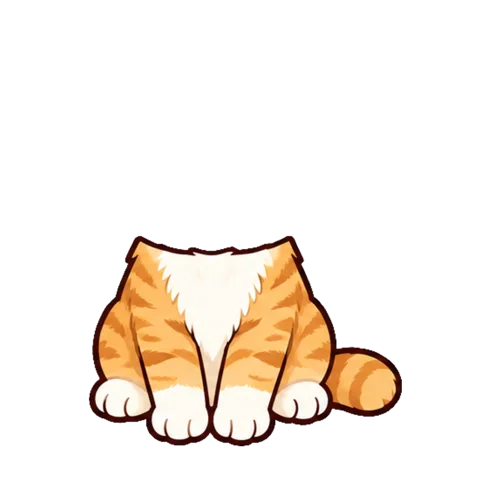
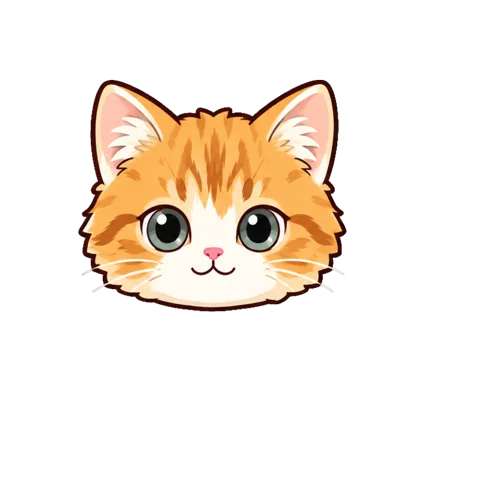
Hi! I live on your desktop now.
If we can't make your pet, it doesn't count. Try another picture. Only use pictures you have the right to use. We don't train AI on your picture, and the uploaded copy is deleted within 24 hours. This is an unofficial fan tool, not affiliated with BUG (@BUGnDEV), who makes BUG Clicker.
Paid without an account?
Enter the email you paid with and we'll send you a sign-in link. Your pets and credits come with you.
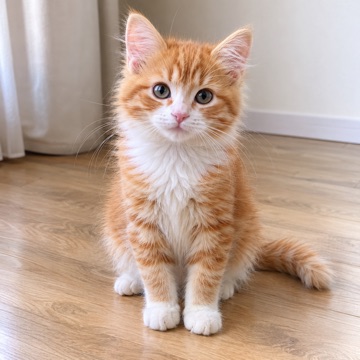
Drop in a photo
Where it is:The drop box on the left
The example photo was made with AI.
BUG Clicker is a free desktop companion app for Windows and Mac (beta), made by the Korean solo developer BUG. Your character lives on your desktop: click it for a click sound and a speech-bubble reply, hold it and it trembles, rub its head and little emotes float up. It can also remind you to drink water or take your meds, and you can share your character with friends as a .cvclk file.
Don't have BUG Clicker yet? Download it freeHow it works
Upload a picture
A clear photo of your cat or dog, or your OC. Just one, facing you if possible.
Pay once, $4.99
On Stripe's checkout page, no account needed. Drawing starts as soon as you're back.
Drag it into BUG Clicker
Download one .cvclk file and drop it into the Share tab in BUG Clicker's settings.
- Four faces, lined up: normal, clicked, blinking and petted
- Lines it says when you click it, and now and then on its own
- A .cvclk ready to import, plus the PSD
- Two free redraws if the faces don't line up
Dress up the speech bubble too
When you download your pet, pick a bubble style: hang bag charms on it, or give it a Y2K sparkle or an alien glitch. These clips were recorded in BUG Clicker.
- 3 bubble styles, more on the way
- 8 charms: hang one or two, on the left or right
- Free with every pet
Pictures that make good pets
The maker draws your pet from a single picture, so the picture decides most of the result. These help the most:
- One character per picture
- If two pets or two characters share the picture, the maker can't tell which one you mean. Crop it down to the one you want first.
- Facing you
- A face looking at the camera, or at the viewer in a drawing, gives the four faces the most to work from. Side views and backs come out less like your pet.
- Clear and well lit
- A sharp picture where you can see the eyes, the markings and the colors. Blurry, dark or tiny pictures lose the details that make the pet look like yours.
- Pick the right mode
- Choose My cat or dog for a real pet photo, and My character for an OC, a drawing or a selfie. Each mode draws in its own way and starts with its own lines.
- PNG, JPEG or WebP, up to 8 MB
- iPhone HEIC photos work in Safari. In other browsers, share the photo as JPEG first; a screenshot of the picture works too.
Getting it into BUG Clicker
Your pet arrives as one .cvclk file. BUG Clicker imports it from its own settings, so there are no folders to copy and nothing to install.
Add it to BUG Clicker in 5 steps
1Right-click your pet on the desktop and choose Open settings…. No pet on screen? Click the BUG Clicker icon in the taskbar tray at the bottom right (it may hide under the ^ arrow).
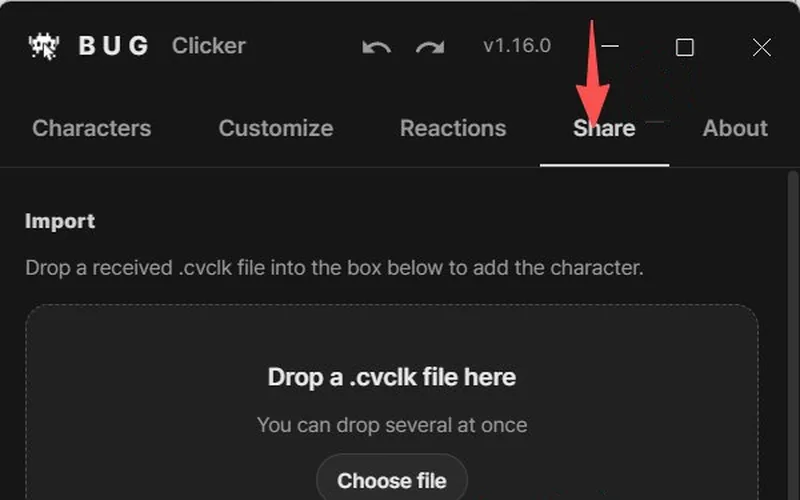
2Open the Share tab.
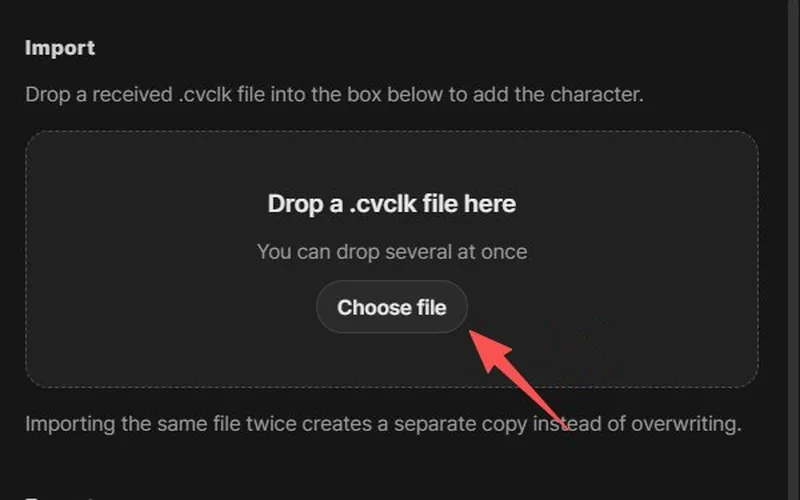
3Drag the .cvclk file into the box that says Drop a .cvclk file here (or click Choose file), then click Import.
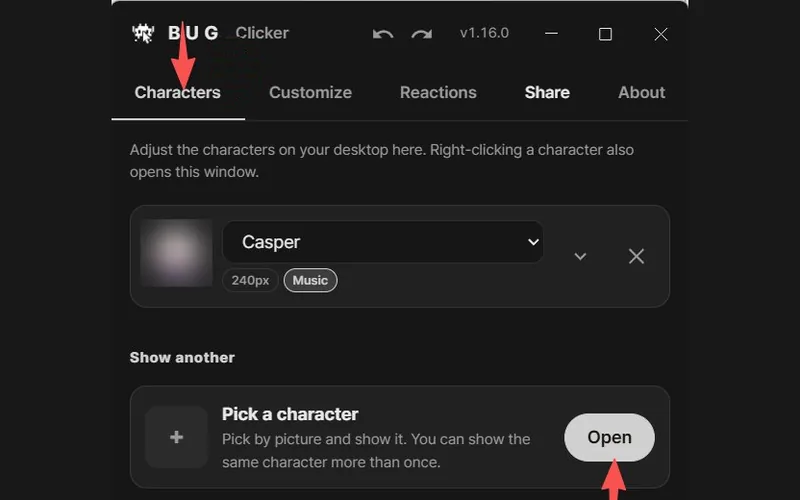
4Not on your desktop yet? Open the Characters tab and click Open next to Pick a character.
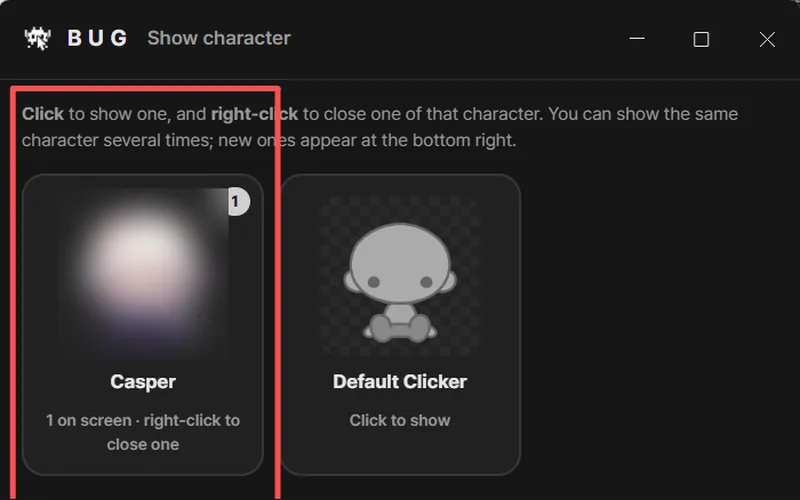
5In the Show character window, click your pet to put it on the desktop. Right-click its card to close one.
Screenshots: BUG Clicker 1.16, English, shared by @NEKOYAMAMONO on X
Tip: no need to dig through folders. Drag the file straight from your browser's downloads list into the box.
- Works with every BUG Clicker version. No update needed.
- Importing adds a new character. It never replaces the ones you already have.
- BUG Clicker set to another language? The buttons are in the same places.
Pricing
Pay once, no subscription. 10 credits make one pet, and credits never expire.
$4.99
1 pet · try it with your favorite character
- Four lined-up faces and lines
- .cvclk for BUG Clicker, plus the PSD
- Two free redraws; not charged if it can't be made
- Credits never expire; emailed link to get back to your pets
$9.99
3 pets, $3.33 each
- Four lined-up faces and lines
- .cvclk for BUG Clicker, plus the PSD
- Two free redraws; not charged if it can't be made
- Credits never expire; emailed link to get back to your pets
Prices in USD. Not happy? Write to us within 7 days. Refund policy
BUG Clicker, the desktop pet that clicks back
BUG Clicker keeps a little character on your Windows or Mac desktop. Click it and it squishes, makes a click sound and answers in a speech bubble. This guide covers the download, the first launch and making your own character.
Unofficial fan guide. BUG Clicker is made by BUG (@BUGnDEV), and the download buttons fetch the latest version straight from the developer's GitHub.
- Click it
- The head squishes down, the click sound plays and the character answers with one of its lines in a speech bubble. Hold the click and it trembles.
- Rub its head
- Move the mouse back and forth over the head and it switches to its happy face, with hearts, notes or another effect floating up.
- Let it remind you
- Set reminders for water, medicine or your to-dos, and your character tells you when it's time.
- Make it yours
- Character Studio loads your own art as a PSD or separate images. Add parts like ears, tails and wings, write its lines, then share it as a .cvclk file.
BUG Clicker guides by topic
All guidesBUG Clicker questions
What pictures can I use?
One character per picture, facing you if possible: your OC, a drawing, or a clear photo of your pet. Use only pictures you have the right to use. We don't use your picture to train AI and delete the upload within 24 hours.
Does the pet work in the real BUG Clicker?
Yes. You get a .cvclk file for the official BUG Clicker app, on Windows or Mac and in any version, plus a PSD. Open BUG Clicker's settings, go to the Share tab and drop the file in.
How long does it take?
Usually about a minute after you pay. We also email you a link, so you can come back to your pet later or from another computer.
What if it doesn't come out right?
If the faces don't line up we redraw them for free, up to twice. If it still can't be made, the 10 credits go back to your balance so you can try another picture. Not happy? Write to us within 7 days for a refund.
How do credits work? Do they expire?
Each pet costs 10 credits. $4.99 buys 10 credits (one pet) and $9.99 buys 30 (three pets). Credits never expire, and a pet that can't be made gives its credits back.
Is BUG Clicker free?
Yes. BUG Clicker is a free app from the developer BUG (@BUGnDEV). You download it from the developer's GitHub, with no account and no payment.
Is BUG Clicker safe? Why does Windows warn me?
The app is not code-signed yet, so Windows SmartScreen and macOS show a warning the first time you open it. The warning is about the missing signature, not a detected virus. Download it only from github.com/BUG-INVADE, never from re-upload sites.
Does BUG Clicker work on Mac?
Yes, as a test build for macOS 12 or later, on both Apple silicon and Intel Macs. It lives in the menu bar instead of the Dock, and like the Windows app it reacts to clicks, petting, music and typing.
Who makes BUG Clicker? Is this the official site?
BUG Clicker is made by the Korean creator BUG, who posts news on X as @BUGnDEV. This site is an unofficial guide written by fans and is not affiliated with the developer.
Where are my characters saved?
On Windows they sit in the "BUG Clicker 데이터" (data) folder next to the exe, so move the two together. On a Mac they are in ~/Library/Application Support/BUG Clicker.
How do I update BUG Clicker?
It updates itself. To check by hand, open Settings, then About, then Update.
Is there a phone or Android version?
No. BUG Clicker runs on Windows and Mac only. Phone apps called "Bugs Clicker" are an unrelated insect-tapping game.